TotalAV reviewed in context: what antivirus and PC optimisation software can and cannot do
Advertising disclosure
This is a commercial page. The links marked partner link are affiliate links: if you subscribe through one, the vendor pays Burksled s.r.o. a commission. The price you pay is the vendor’s normal price — nothing is added for using our link, and we receive no payment for a favourable opinion. Nothing on this page is a review commissioned or approved by the vendor. Our editorial policy sets out what we will and will not publish.
Security software is sold on fear and bought on hope. This guide tries to do something less exciting and more useful: explain what the technology in a consumer security suite actually does, where its limits are, what Windows already gives you for nothing, and what to check before you put your card details into any subscription — including TotalAV, the product this page earns a commission on.
What this page is, and is not
It is an explanatory guide written by our editorial team, funded by affiliate commission. It is not a laboratory test. We do not run malware samples, we publish no scores of our own, and we do not print testimonials or star ratings from anonymous “readers”. Where detection performance is discussed we point you to the independent testing institutes that actually measure it. Product features and prices change often: the vendor’s own current information prevails over anything written here, and you should check it before you buy.
What you are actually defending against
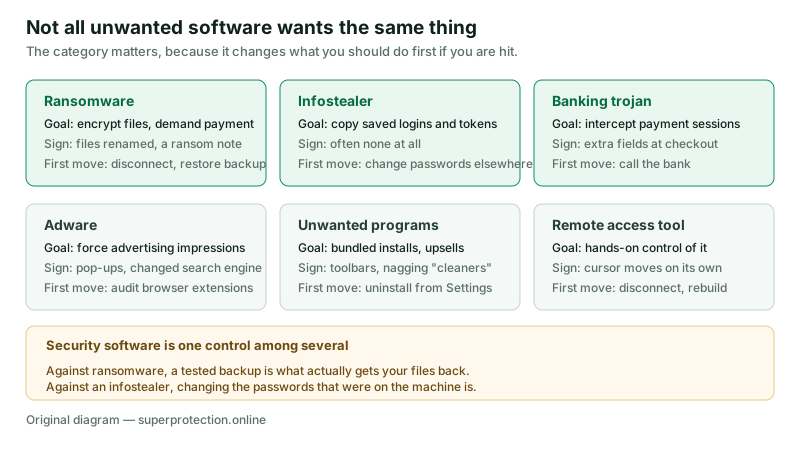
“A virus” is a category that stopped being useful about twenty years ago. What reaches an ordinary home computer today is a mixed set of things with different aims, and the aim changes what you should do about it. Ransomware wants your files unreadable so that you pay to get them back. An infostealer wants the passwords and session tokens your browser has saved, and it is specifically designed to leave no sign at all. Adware wants advertising impressions. A remote access tool wants a person on the other end to use your machine as if they were sitting at it.
That distinction matters practically. Against ransomware, the control that actually recovers your files is a backup you have tested — security software is what reduces the chance you need it. Against an infostealer, the urgent action after cleaning the machine is changing the passwords that were on it, because those credentials have already left. Against adware, the first place to look is usually the browser’s extension list rather than the antivirus scanner.
For a picture of how these threats are moving at European level rather than anecdotally, the EU Agency for Cybersecurity (ENISA) publishes an annual Threat Landscape report; it is free, it is methodologically explicit, and it is a better basis for a decision than any marketing page, including this one.
TotalAV — the product this page is funded by
If, having read the rest of this page, a single paid suite is what suits you, you can see the plans, the current pricing and the renewal terms on the vendor’s own site.
Burksled s.r.o. earns a commission if you subscribe through this link. You pay the vendor’s normal price — nothing is added for using it.
How antivirus software decides what is dangerous
Consumer antivirus products are usually described as if they carried a list of viruses and checked files against it. That was true once and it is now only one of several mechanisms. Modern engines, TotalAV’s included, generally combine four approaches.
Signature matching compares a file against patterns extracted from known malware. It is fast, precise and essentially useless against something written last week. Static heuristics look at the structure of a file without running it — packing, obfuscation, imports that no ordinary program would need — and score how suspicious it looks. Cloud reputation sends a hash or metadata to the vendor and asks what the rest of the install base has seen: a file signed by a known publisher and present on millions of machines is treated differently from one that has been seen four times in two days. Behavioural monitoring watches what a program does once it is running — mass file rewrites, attempts to delete shadow copies, injection into other processes — and can stop it mid-act, sometimes after testing it first in a sandbox.
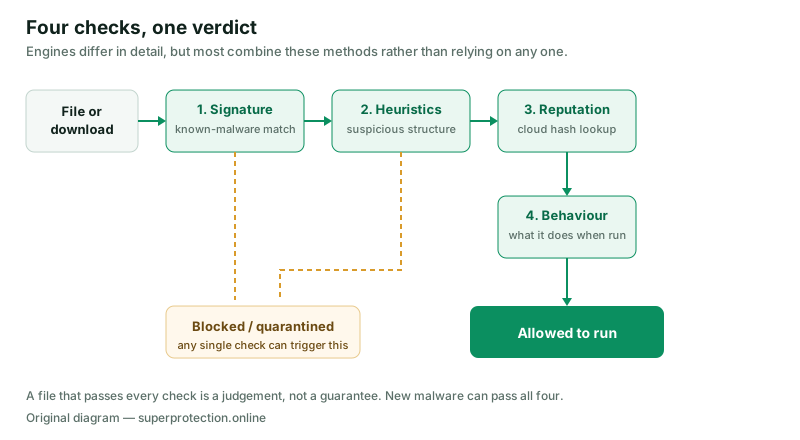
Two consequences follow, and neither appears in advertising. First, no product detects everything. The honest question is not whether a suite blocks malware but how it ranks on detection and on false positives against its peers, which is what the testing institutes measure. Second, the cloud reputation step means your security software is in regular contact with its vendor about the files on your machine. That is normal and it is how the detection works, but it is a genuine privacy trade-off and it belongs in a buying decision. Read the vendor’s privacy policy, not only its feature list.
What “PC optimisation” really means
This is the part of the category where marketing has done the most damage, so it deserves plain speech. Cleanup tools do three genuinely different things, and only some of them help.
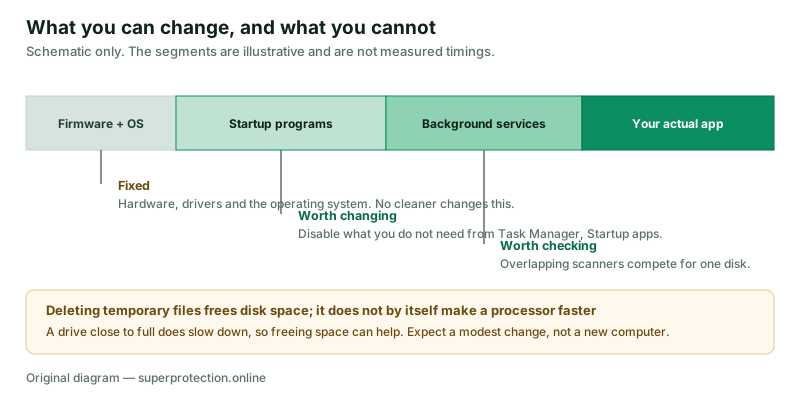
Freeing disk space is real and sometimes matters. Temporary files, old installers, browser caches and previous Windows versions can occupy a lot of a small drive, and a drive running close to full does slow down. Deleting them recovers space. It does not make the processor faster.
Managing what starts with the computer is the change most likely to be felt. Every program that launches at sign-in competes for the same disk and CPU during the minute you are waiting. Turning off the ones you do not need shortens that wait. You do not need a paid tool for it: on Windows, Task Manager has a Startup apps tab that shows each item and rates its startup impact.
Registry cleaning is the claim to treat sceptically, and we have corrected our own earlier copy on this point. An earlier version of this page described a “deep system and registry cleaner” removing “orphaned registry entries” as a performance measure. There is no good public evidence that deleting unused registry keys measurably speeds up a modern Windows machine, and Microsoft has never supported the use of registry-cleaning utilities. We have removed that claim. If a product you are considering leads with registry cleaning as a speed feature, treat that as a reason for scepticism about the rest of its performance marketing.
What TotalAV is
TotalAV is a consumer security suite for Windows, macOS, Android and iOS, published by Protected.net Group Limited. It is sold as a subscription, in several tiers, and it bundles an antivirus engine with a set of adjacent tools.
A correction to our earlier text
An earlier version of this page stated that TotalAV “includes these features in its standard package” when listing the VPN, password manager and breach monitoring. That was wrong and we have removed it. Which tools you get depends on which plan you buy — the entry-level antivirus tier does not include everything the top tier does, and the free tier is more limited again. Check the vendor’s current plan comparison before subscribing. We also removed a reference to protecting children from inappropriate content, because we could not verify a parental-control or content-filtering feature in the product.
Broadly, and subject to that caveat about tiers, the suite covers: real-time and on-demand malware scanning; a web-protection component that blocks known malicious and phishing sites in the browser; a junk-file cleaner and a startup-program manager; a browser-data cleaner; a VPN; a password vault; and a data-breach check for your e-mail address. The interface is built for people who do not want to configure anything, which is a real design choice with real costs: it is easy to use and it gives you fewer knobs than an enterprise-oriented product would.
Feature lists, plan boundaries and prices change without notice. For anything that will determine your decision — what is in the plan, what it costs in the first term, what it costs on renewal — read the vendor’s own site (official site, not a partner link). Where TotalAV’s own current information differs from this page, the vendor’s information prevails.
Check the plan boundaries yourself
Because what is included varies by tier, the only reliable comparison is the vendor’s current plan table. It also states the renewal price, which is the number most people miss.
Burksled s.r.o. earns a commission if you subscribe through this link. You pay the vendor’s normal price — nothing is added for using it.
The VPN: what it does and does not do
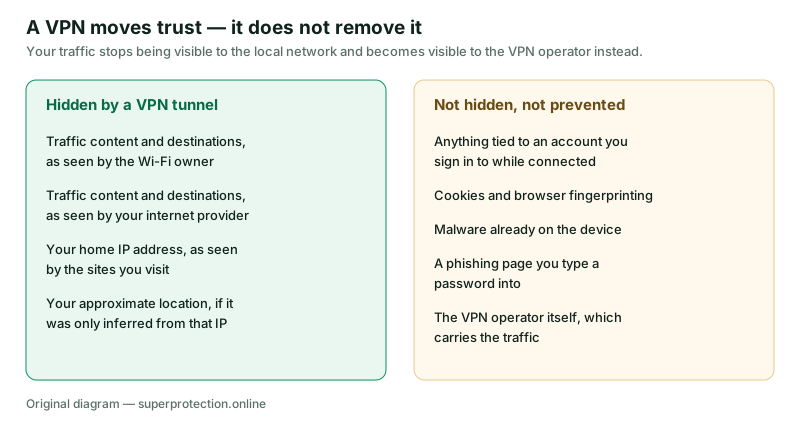
A VPN is the single most oversold component in consumer security bundles, so it is worth being precise. A VPN encrypts your traffic between your device and the provider’s server and gives you that server’s IP address. That genuinely stops the café Wi-Fi owner and your internet provider from seeing which sites you reach, and it stops those sites from seeing your home IP.
It does not make you anonymous. If you sign into an account while connected, that account knows it is you. Cookies and browser fingerprinting still identify the browser. A VPN cannot remove malware already on the machine, and it cannot stop you typing a password into a convincing fake login page. And the traffic has to pass through someone: a VPN moves your trust from your internet provider to the VPN operator, which is a different question, not a solved one.
Password vaults and breach monitoring
Of everything in a suite like this, a password manager is probably the component with the clearest benefit, for an unglamorous reason: it is the only practical way for an ordinary person to have a different password on every site. Password reuse is what turns one company’s breach into your problem everywhere else. Current guidance from NIST has moved away from forced complexity and rotation rules towards length and, above all, uniqueness — which is exactly what a vault makes possible.
Breach monitoring — sometimes marketed as “dark web monitoring” — needs one honest correction, which we have also made to this page. Our earlier text said it alerts you “before threats can be exploited”. It cannot. These services check your address against collections of already-leaked data. The alert necessarily arrives after a breach has happened and the data has surfaced. That is still useful — it tells you which password to change — but it is a detection tool, not a preventive one, and no service can see all leaked data.
The same applies to the “privacy scanner” that clears cookies and browsing traces. Our earlier wording said it “protects your anonymity online”. Clearing local browser data removes local traces; it does not make you anonymous to the sites you visit, who can identify you by account, by fingerprint or on your next sign-in.
How to read independent lab results
You should not take our word on detection quality, and you should not take the vendor’s either. Two European institutes test consumer security products continuously and publish their methodology: AV-TEST in Germany and AV-Comparatives in Austria. Both are free to read.
Three things to look at when you do. Recency: a product’s standing can change between test rounds, so a badge from three years ago means little. False positives: a scanner that blocks everything scores well on detection and makes the machine unusable; the false-positive column is half the story. Whether the product is tested at all: participation in public testing is voluntary and vendors choose which rounds to enter, so check whether the product you are considering appears in the current round rather than assuming it does.
We have deliberately printed no scores here. Any number we quoted would be out of date by the time you read it, and we are not going to invent one.
Windows already includes Microsoft Defender
A guide funded by antivirus commission ought to say this plainly, so: every supported version of Windows 10 and Windows 11 ships with Microsoft Defender Antivirus turned on, at no extra cost, together with a firewall, SmartScreen reputation filtering in Edge, and ransomware protection for selected folders, which is switched off by default and worth turning on. Defender participates in the public tests named above and has for years performed respectably in them.
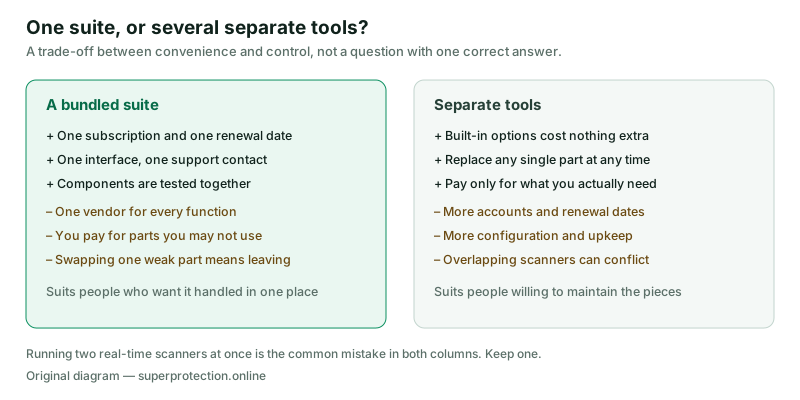
So the real question when considering any paid suite is not “is this better than nothing” but “what does this add over what I already have, and is that worth the subscription to me?” Reasonable answers exist — cross-platform cover for a household of Windows, Mac and Android devices under one subscription; a bundled VPN and password vault you would otherwise buy separately; one interface and one support contact instead of four. Those are matters of convenience and preference, and they are legitimate reasons to buy. “You are unprotected without it” is not, and any page that tells you so is selling.
One technical point that applies whatever you choose: do not run two real-time scanners at once. They interfere with each other and the result is slower and less reliable, not safer. Installing a third-party suite normally stands Defender down automatically; leave it that way rather than trying to run both.
The measures that cost nothing
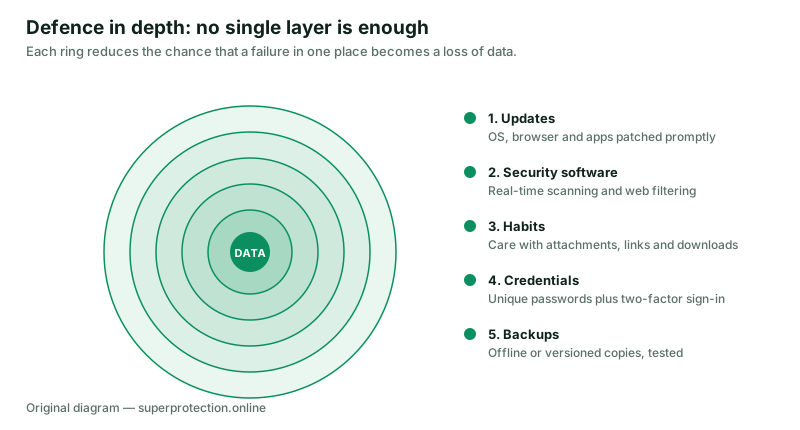
If you do nothing else on this page, do these. None of them requires a purchase and between them they prevent more harm than any single product.
- Install updates promptly — operating system, browser and applications. The large majority of successful attacks on home machines use a flaw that was already fixed.
- Turn on two-factor authentication on e-mail first, then banking, then everything else. Your e-mail account is the reset route to every other account you own.
- Keep one backup that is offline or versioned, and restore a file from it once so you know it works. This is the control that defeats ransomware.
- Use a different password on every site, with a manager of any kind — bundled, standalone or the one built into your browser.
- Audit your browser extensions and remove anything you do not actively use. An extension can read every page you open.
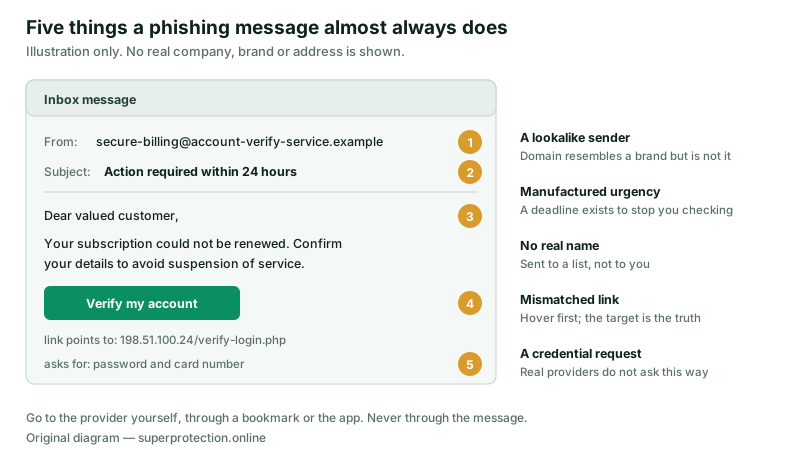
- Treat urgency as the warning sign. Anything demanding action within twenty-four hours deserves to be verified through a route you chose yourself.
Before you subscribe: price, renewal, refunds
This section applies to any consumer security subscription, TotalAV’s included, and it is where most complaints about this whole product category originate.
| Check before you buy | Why it matters |
|---|---|
| The renewal price, not the first-term price | Introductory pricing in this category is usually a discount on the first term only. The figure that recurs is the one to compare against competitors. |
| Whether the subscription auto-renews, and how to switch that off | Automatic renewal is the norm. Find the setting in the account area and decide deliberately rather than by default. |
| Which plan actually contains the feature you want | VPN, password vault and breach monitoring are commonly tier-dependent. Buying the wrong tier is the most frequent avoidable mistake. |
| How many devices and which operating systems | Device counts and platform support differ by plan. |
| The refund window and how to claim it | Money-back periods are set by the vendor and are separate from your statutory rights. |
| Your statutory withdrawal right | See below. |
On that last point: under EU consumer law, a consumer buying at a distance from a trader generally has a 14-day right of withdrawal. For digital content and services there is an important qualification — if you asked for immediate supply and expressly acknowledged that doing so ends the withdrawal right, you may lose it, and for services begun at your request you may owe a proportionate amount for what was used. The exact position depends on the trader, the contract and your country of residence, so read the terms at the point of purchase. The European Commission’s Your Europe portal sets out the general rules in plain language. We are a publisher, not your legal adviser, and this paragraph is general information rather than advice about your contract.
If TotalAV is the right fit for you
Read the plan table and the renewal terms on the vendor’s site first, decide on the tier that contains what you actually want, and check whether auto-renewal suits you.
Burksled s.r.o. earns a commission if you subscribe through this link. You pay the vendor’s normal price — nothing is added for using it.
Who a suite like this suits
A bundled suite tends to make sense for a household that runs several devices on different operating systems and would rather hold one subscription than four; for someone who wants a VPN and a password vault and has not already bought them separately; and for people who would genuinely prefer not to configure anything and will not, if left to themselves, turn on backups or two-factor authentication on their own.
It tends to make less sense for someone running a single up-to-date Windows machine who already uses a password manager, keeps backups and is comfortable with Defender — for that person a paid suite is mostly buying convenience; and for anyone who wants to choose the best individual tool in each category, since a bundle is by definition one vendor’s answer to all of them.
Neither of those is a verdict on product quality. It is a description of who the shape of the product fits, which is a different and more useful question than a score out of ten.
Sources and corrections
The general security explanations on this page draw on publicly available material from the following bodies. We have linked to organisations rather than to individual reports, because report URLs change and the organisation pages will still lead you to the current edition.
- ENISA — the European Union Agency for Cybersecurity, for the annual Threat Landscape reports.
- AV-TEST Institute and AV-Comparatives — independent testing of consumer security products, with published methodology.
- Microsoft Support — for what Windows Security and Microsoft Defender Antivirus include, and for the Startup apps tab in Task Manager.
- CISA StopRansomware — for backup and ransomware response guidance.
- NIST SP 800-63B — for current password guidance, including the move away from forced rotation.
- Your Europe — European Commission — for the consumer right of withdrawal on distance contracts.
- TotalAV (official site, not a partner link) — for product features, plan composition and pricing. The vendor’s own current information prevails over this page.
Corrections made to this page
On 23 September 2026 this article was rewritten. The following claims present in the earlier version were removed or corrected, and we record them here rather than deleting them quietly, in keeping with our corrections procedure:
- A statement that the average computer carries “dozens” of unnecessary programs — removed; we had no source for it.
- “Deep system and registry cleaner” presented as a performance feature — corrected, as set out under PC optimisation.
- A claim that the VPN, password manager and breach monitoring are in the standard package — corrected; these are tier-dependent.
- “Users commonly report faster boot times” — removed; an unmeasured performance claim.
- Breach monitoring described as alerting you before exploitation — corrected; it is necessarily after the fact.
- A privacy scanner described as protecting anonymity — corrected; it clears local traces.
- A reference to protecting children from inappropriate content — removed; we could not verify such a feature.
- “Join thousands of users” and the framing of the page as a reader-submitted story — removed; the page is editorial written by a named editor and was never reader-submitted.
- Star ratings and a reader-review widget — removed entirely, along with the browser storage they relied on.
Trademark notice
TotalAV is a trademark of Protected.net Group Limited. Windows, Microsoft Defender and SmartScreen are trademarks of Microsoft Corporation. All other product names, logos and brands are the property of their respective owners and are used here for identification only. superprotection.online is an independent publication operated by Burksled s.r.o. and is not affiliated with, endorsed by, sponsored by or otherwise connected to TotalAV, Protected.net Group Limited, or any other company named on this page.
About the illustrations
Every diagram on this page was drawn specifically for it as an original SVG file by our editorial team. There are no product screenshots, no stock photography and no third-party images. Nothing on this page is loaded from an external server.