Cookie policy
This website stores nothing on your device. No cookies. No localStorage, no sessionStorage, no IndexedDB. No analytics, no advertising pixels, no fingerprinting, and no requests to any third-party server. That is not a promise about what we do with data we collect — it is a statement that there is nothing to collect.
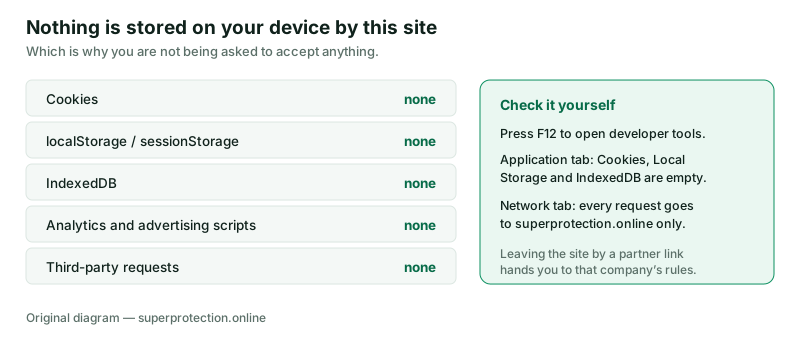
1. Why there is no consent banner
Under Article 5(3) of the ePrivacy Directive (2002/58/EC, as amended), consent is required before storing information on, or gaining access to information already stored on, a user’s terminal equipment — with a narrow exemption for what is strictly necessary to deliver the service the user asked for.
The obligation is triggered by the storage or access. We do neither. Since we store nothing and read nothing from your device, there is nothing for you to consent to, and a banner asking you to accept it would be theatre. Rather than ask permission to track you and then track you when you click the big button, we removed the tracking.
The same reasoning applies to the GDPR: there is no set of identifiers here to be lawful or unlawful about. What the web server unavoidably records in its log files is described in the privacy policy, section 3.
2. What a cookie is, so the claim is checkable
A cookie is a small piece of data a site asks your browser to store and return on later requests,
which is how sites recognise a returning browser. Related mechanisms do the same job differently:
localStorage and sessionStorage keep key-value pairs in the browser,
IndexedDB keeps a structured database, and fingerprinting builds an identifier out of
your browser’s characteristics without storing anything at all. We use none of
them. A previous version of this website did use browser storage — for a review widget and
for a consent record — and all of it has been removed along with the features that needed it.
3. How to verify this yourself
Do not take our word for it. It takes about a minute in any modern desktop browser.
- Open this page, then press
F12(orCtrl+Shift+I; on a Mac,Cmd+Option+I) to open the developer tools. - Go to the Application tab in Chrome or Edge, or Storage in
Firefox and Safari. Look at Cookies, Local Storage, Session Storage and
IndexedDB for
superprotection.online. Every one of them will be empty. - Go to the Network tab and reload the page with
Ctrl+R. Every request in the list goes tosuperprotection.online— the HTML, one stylesheet, two small scripts and the SVG diagrams. No other domain appears. - Still in the Network tab, click the document request and read the Response
Headers. There is no
Set-Cookieheader.
If you ever find that any of the above is untrue, please tell us at info@superprotection.online. It would be a fault and we would fix it and record the correction publicly.
4. What we did instead of the usual things
| Common practice | What we do here |
|---|---|
| Google Fonts or another font CDN | A system font stack. The page uses the fonts already on your device; no font is downloaded. |
| Analytics to count visitors | Nothing. We do not know how many people read this page. |
| Advertising and conversion pixels | Nothing. Commission is attributed by the partner network after you leave, not by a tag here. |
| A JavaScript library from a CDN | Two small scripts, written for this site and served from it. Neither touches browser storage. |
| Remote or stock images | Original SVG diagrams, self-hosted. |
| A consent banner | None, because there is nothing to consent to. |
5. What our scripts do
There are two, both small and both readable in your browser’s view-source. One handles
smooth scrolling for the in-page table of contents. The other copies advertising click identifiers
(such as msclkid, gclid or utm_ parameters) from the URL you
arrived on to the partner link you click, so that the partner network can attribute a commission,
and re-applies the sponsored nofollow noopener attributes to those links.
Neither script writes to your device, and neither sends anything anywhere. Those
parameters travel only in the URL at the moment you choose to click a partner link.
6. When you leave this site
This policy covers superprotection.online only. Partner links are clearly labelled, and following one takes you to another company’s website, which will almost certainly set cookies and will have its own cookie and privacy policies. We have no control over that and we do not receive data back from it. Read their policy before you provide them with anything.
7. Changes
If we ever introduce anything that stores data on your device, we will change this page first, say what changed, and implement the consent mechanism that the law then requires. We have no plans to.